
How to Humanize AI Content (Without Sounding Like a Robot)
Let’s be honest.
AI writing is amazing. You can type a few words, and boom, a full article appears in seconds. But if you’ve used tools like ChatGPT or Jasper for a while, you’ve probably noticed something weird. It sounds off. Too polished. Too predictable. Like someone who read every writing rule and forgot what a real human sounds like.
I’ve spent the last 100 days writing with AI every single day. At first, it was just an experiment to see what it could really do. Over time, it became a habit. Some days it nailed my tone. Other days it wrote like a polite alien. The more I used it, the more I realized that the secret isn’t in the tool, it’s in how you talk to it.
That’s where humanizing AI content comes in.
It’s not about hiding the fact that you used a tool. It’s about making your writing feel natural again. You want your words to sound like they came from a person, not a machine that swallowed a dictionary.
And the good news? You can do it. You don’t need fancy software or a team of editors. Just a few smart habits and a better way of working with your AI. What I’ll share here comes from both experience and research, real data, expert studies, and a hundred days of testing what actually works. By the end, you’ll know how to write with AI in a way that feels human, authentic, imperfect, and alive.

Why AI Writing Often Sounds Robotic
If you have ever read something and thought, “Did a person write this?” you already know the problem. AI writing sounds strange because it is missing one key ingredient. It does not actually think. It predicts.
Every sentence it writes is based on patterns, not emotion. It looks at billions of examples and guesses what word should come next. That is how language models like ChatGPT work. They are fast and impressive, but they do not feel what they say. You can find a simple explanation of how these systems work in my Beginner’s Guide to Generative AI.
OpenAI explains this process in more detail in its technical overview. The model studies huge amounts of text, learns patterns, and then predicts how people might respond. That is why it can sound smart but still miss the small things that make writing feel alive.
Think about it like cooking from a recipe. You can follow every step perfectly, but if you have never tasted the dish, you will not know what it needs more of. AI is the same way. It knows the recipe for good writing but has never tasted it.
This is why AI writing often feels flat or overly polite. It repeats safe phrases. It avoids strong opinions. It writes the way a machine should: efficient, clear, and just a little too perfect.

Most people notice this without knowing why. They just feel that something is missing. That “something” is rhythm, surprise, and emotion. The parts of writing that come from real experience.
When you understand that, it becomes easier to fix. You are not fighting the AI. You are giving it flavor.
How to Humanize AI Content (Step-by-Step)
- Refine your prompts for natural tone – Learn how to guide AI with clear tone and context so it starts writing the way you actually want.
- Use AI to edit like a human – Turn your AI into a co-editor that helps you fix rhythm, tone, and flow.
- Add personality, rhythm, and real experience – Bring life to your writing by teaching AI how to sound more human and relatable.
Refine Your Prompts for Natural Tone
If you have ever told ChatGPT to “make it sound more human” and still got something stiff, you are not alone. Many people use the right command but the wrong context. The AI listens, but it does not really know what “human” means until you show it.
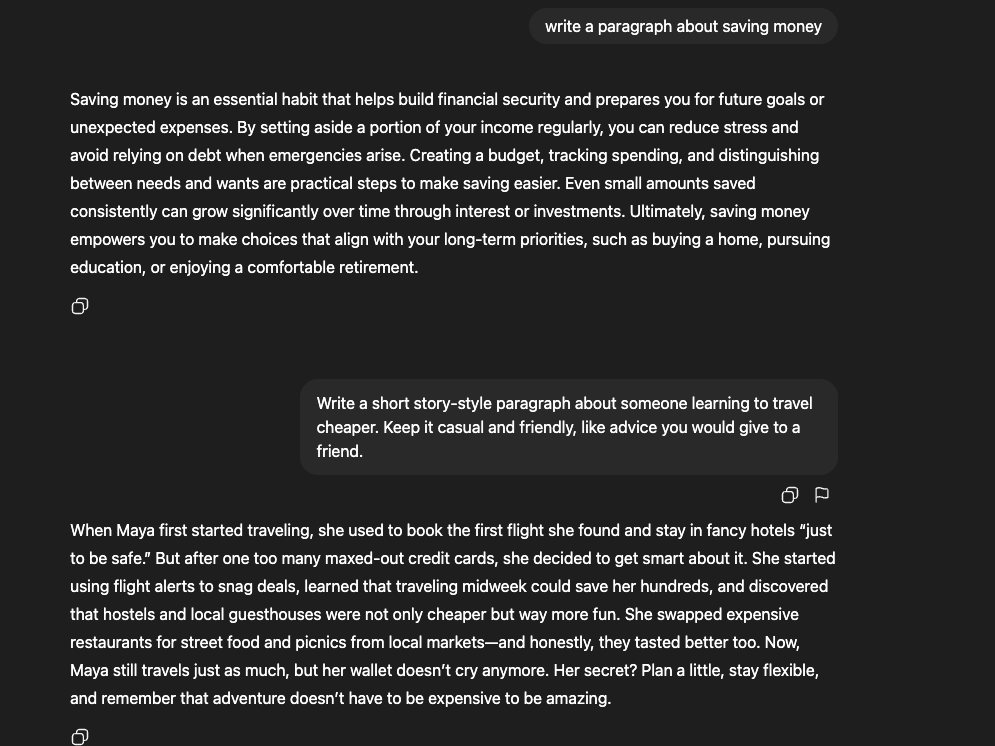
The secret is not in the words “sound natural.” It is in the details that follow. Instead of giving a short command like “write a paragraph about saving money,” describe how it should feel. For example:
“Write a short story-style paragraph about someone learning to travel cheaper. Keep it casual and friendly, like advice you would give to a friend.”
That small change makes a big difference.
When the AI is told how to sound, it shifts from copying structure to copying rhythm. It starts using patterns that real people use, such as pauses, contractions, short sentences, and small quirks that make writing feel alive.
Try ending prompts with simple cues like:
“Use short sentences and contractions.”
“Add small details from real life.”
“Avoid perfect grammar.”
These small cues help the model mimic human rhythm and variation. Research from Stony Brook University, The Pennsylvania State University, and the Bosch Center for AI in 2025 found that even advanced language models struggled to capture the informal writing style of everyday authors unless tone and style cues were stated directly. The study showed that while few-shot examples improved imitation, explicit tone instructions were still necessary for natural-sounding results.
This approach sets a mood instead of giving orders.
Effective prompting is less about control and more about collaboration. When tone, emotion, and purpose are built into the request, the writing begins to sound natural, not mechanical.
For readers who want to explore how prompt phrasing shapes tone, the Prompt Engineering Guide 2025 covers the basics and gives examples of phrasing that lead to stronger and more natural results.
Use AI to Edit Like a Human
AI can write fast, but it can also edit well if you know how to guide it. The key is not to ask for “better writing,” but to teach the model what better means.
AI text often feels polished but lifeless. Sentences line up too neatly. Every paragraph starts the same way. The rhythm never changes. A 2025 study in PNAS by researchers at Stanford University found that large language models tend to overuse dense noun phrases and predictable grammatical patterns. The result is writing that feels more like an instruction manual than a conversation.
Instead of fixing it all by hand, use AI as your co-editor. Give it small, specific jobs. Here is a simple workflow that works in almost any writing tool:
Step 1. Ask AI to find what sounds off
“Read this text and point out any parts that sound overly formal, repetitive, or robotic.”
You will often see patterns you missed. The model will highlight phrases like “it is important to note” or “furthermore” that make writing feel stiff.
Step 2. Guide the rewrite
“Rewrite this paragraph so it sounds like a real person explaining the same idea. Keep it clear, but use more natural rhythm and emotion.”
This tells the AI to preserve meaning but loosen tone. You can even specify a goal, such as:
“Make this sound confident but not corporate.”
“Keep the sentence structure varied and conversational.”
Step 3. Give it human direction
Once you get the revision, push one step further:
“Now, make it sound like someone who cares about the reader, not just the topic.”
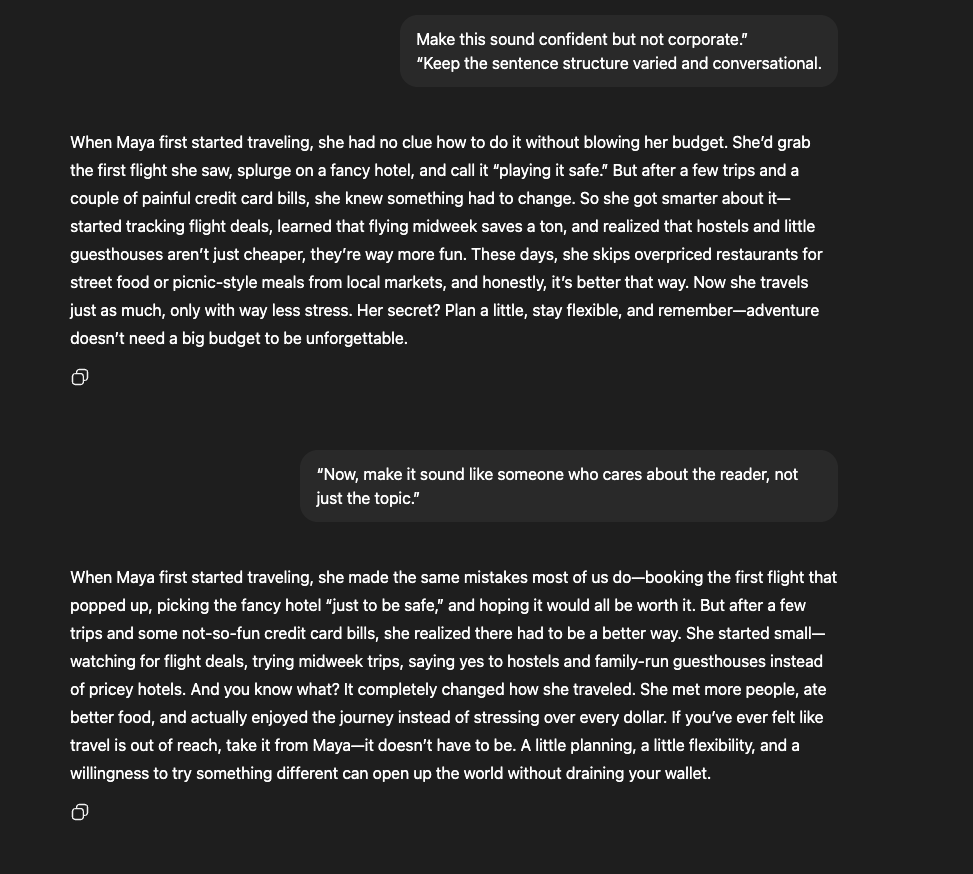
This tiny instruction often changes everything. It adds empathy and flow that the default model tone misses.
Think of AI as a mirror. It reflects what you ask for. If your prompts are flat, the edits will be flat. If your prompts are alive, the writing will be too.
The process of questioning, testing, and improving AI output is the same critical skill that drives learning itself. You can see that mindset in action in How to Use AI to Learn Faster (Without Losing Your Critical Thinking Skills).
Add Personality, Rhythm, and Real Experience
Once your draft reads clearly, it still needs life. Personality is what makes a sentence feel like it came from a person, not a template.
AI plays it safe. It avoids opinion, emotion, and rhythm changes that make writing stand out. A 2025 study in Agents4Science by Bronikowski found that language models rarely use idioms or small conversational markers. Those details are what make readers say, “This sounds real.”
To fix that, guide AI toward how people actually talk. Simple prompts work best:
“Add one small opinion or feeling.”
“Use a few short sentences to make this sound spoken.”
“Include one phrase that shows how this situation feels.”
You can also show it what rhythm you want. Copy one of your sentences and say, “Write the rest in this same style.” The model will usually follow your pattern.
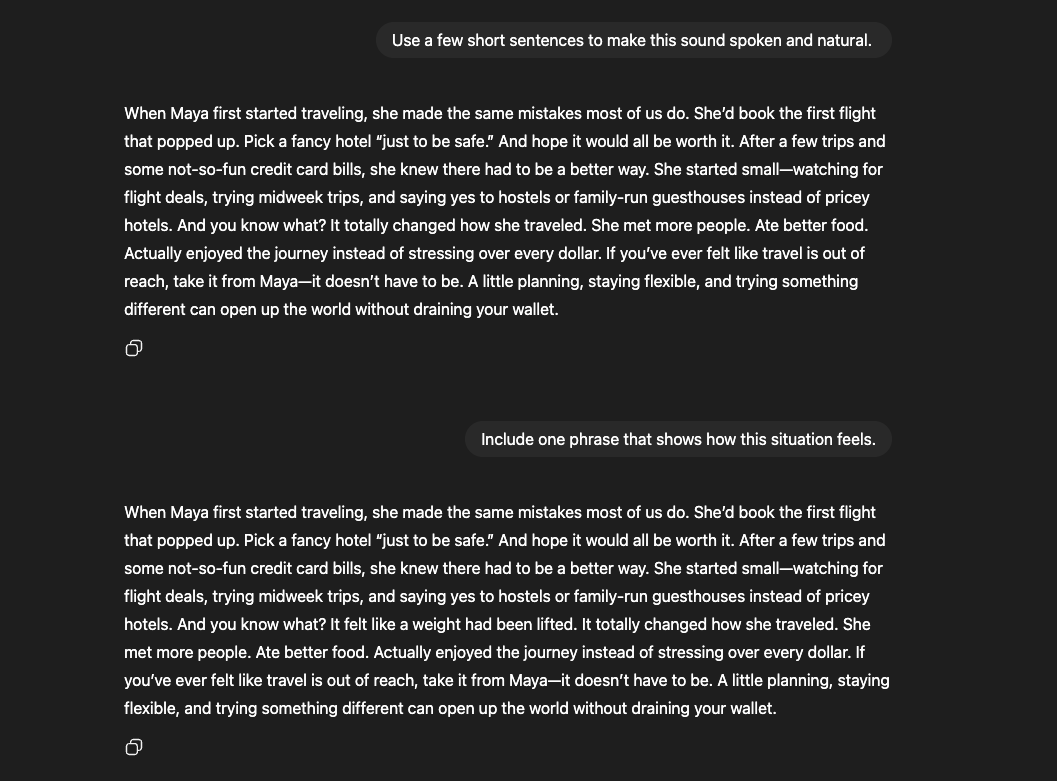
If you want more voice, give it something emotional to work with. Mention a moment, a sound, or a small truth from experience. Even one short image or thought makes a big difference.
Here is a small example:
AI version
Many people struggle to stay focused when learning new skills because distractions are everywhere.
Human edit
Learning anything new is tough. There is always a ping, a buzz, or a reason to stop halfway.
The second version feels human because it sounds like someone thinking. It has rhythm, emotion, and a small piece of life in it.
Adding personality is not about making AI dramatic. It is about giving the words a pulse. When you guide tone, rhythm, and feeling together, the text finally sounds alive.
Free Ways to Humanize AI Content
Not everything that improves AI writing costs money. Most of the time, what matters is time and attention, not new software. After writing with AI every day for 100 days, it became clear that the best improvements came from simple habits, not paid tools.
These are the free methods that consistently made AI text sound more natural. Each one is easy to try and works with any model.
| Method | What It Does | Why It Works |
|---|---|---|
| Use Prompt Chains | Build writing step by step instead of one long command. | Makes AI refine itself and learn your rhythm. |
| Read It Out Loud | Hear where sentences sound flat or forced. | Instantly reveals unnatural rhythm and tone. |
| Add One Real Detail | Drop in a small, specific image or fact. | Turns generic sentences into something believable. |
| Swap Perfect for Real | Leave small imperfections on purpose. | Adds authenticity and warmth that perfect text lacks. |
Each approach fixes a different part of the “robotic” problem. Together they cover tone, rhythm, emotion, and flow, the same elements that define human writing.
Use Prompt Chains Instead of One-Shot Requests
Most people give AI one big prompt and hope for the best. The result is usually a clean draft that sounds nice but forgettable. The secret is to slow it down. Treat writing with AI like a conversation, not a command.
After spending hours testing and refining this process, I built a simple framework that made a real difference. Instead of asking for a perfect draft, start a short chain of prompts. Each one builds on the last.
Here is how it works:
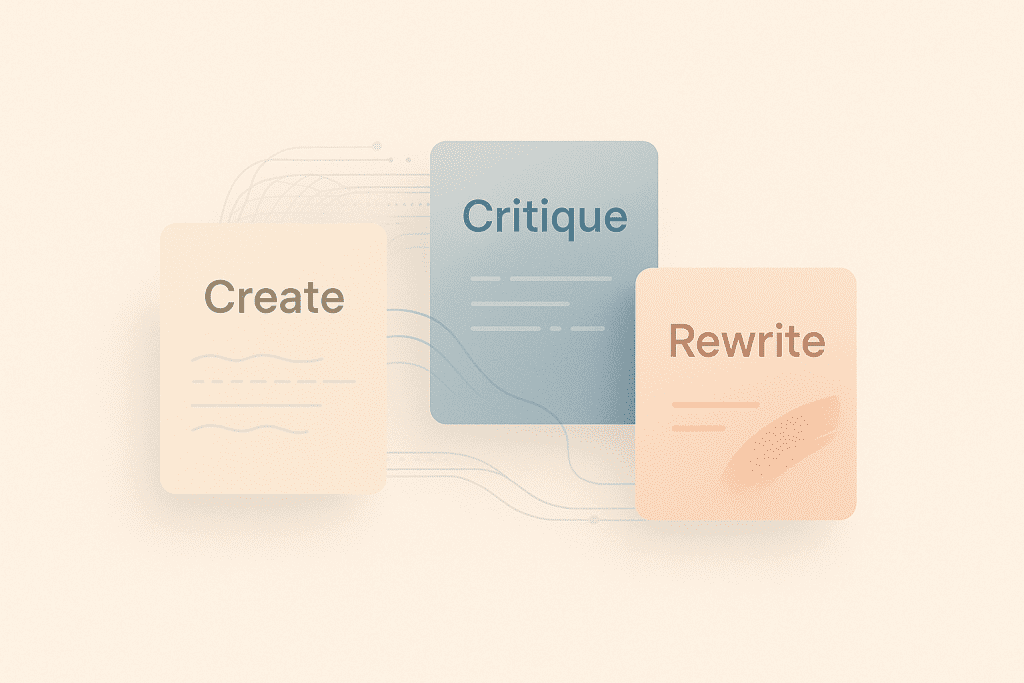
Step 1: Create the draft.
“Write a short paragraph explaining how to stay focused when working remotely.”
Let the AI write freely. Then move to the next step.
Step 2: Ask it to critique tone and rhythm.
“Point out any sentences that sound robotic, formal, or unnatural.”
This teaches the model to recognize its own stiffness.
Step 3: Ask for a rewrite.
“Rewrite this using your feedback. Keep it simple, friendly, and natural.”
The second version is almost always closer to what you want. You can repeat the loop once more for polishing.
Each round gets better because you are giving the model feedback and direction, not one giant list of rules. The process mirrors how good writers work, draft, review, improve.
This method costs nothing and works anywhere. You can run it in ChatGPT, Gemini, or any free writing tool that supports back-and-forth prompts.
Read It Out Loud (or Use Text-to-Speech)
If you want to humanize AI content for free, start by reading it out loud. Hearing the words changes everything. Sentences that look fine on a screen often sound stiff once you speak them.
Reading out loud helps you spot where the rhythm breaks. You’ll notice patterns you didn’t see before, like sentences that all sound the same or phrases that repeat. When that happens, shorten something, swap a word, or add a small pause until it feels natural.
You can also let your computer or phone read it for you. Most AI tools and devices come with a free text-to-speech feature. Listening to your writing through another voice makes it obvious where the tone feels off or the sentences drag.
When something sounds unnatural, fix only what throws off the flow. Tiny tweaks, like contractions, pauses, or a reworded phrase, make a huge difference.
Add One Real Detail
If you want AI writing to sound real, give it something real to grab on to. One small detail can turn flat text into something you can picture.
AI sticks to general language. It says things like “the city was beautiful” or “the meeting went well.” That’s fine, but people don’t talk that way. You’d probably say, “The café was packed, and the air smelled like burnt coffee,” or “The meeting dragged until someone cracked a joke about the projector.”
The real point is that writing shows, it doesn’t summarize.
Here’s a quick example:
AI version
The coffee shop was quiet, and everyone was working.
Human version
The coffee shop hummed with quiet music and the sound of milk steaming behind the counter.
You can almost hear it, right? That’s all it takes, one small image or sound.
When you’re using AI, ask for those touches directly. Try:
“Add one short, specific detail that feels real.”
“Include something the reader could see, hear, or feel.”
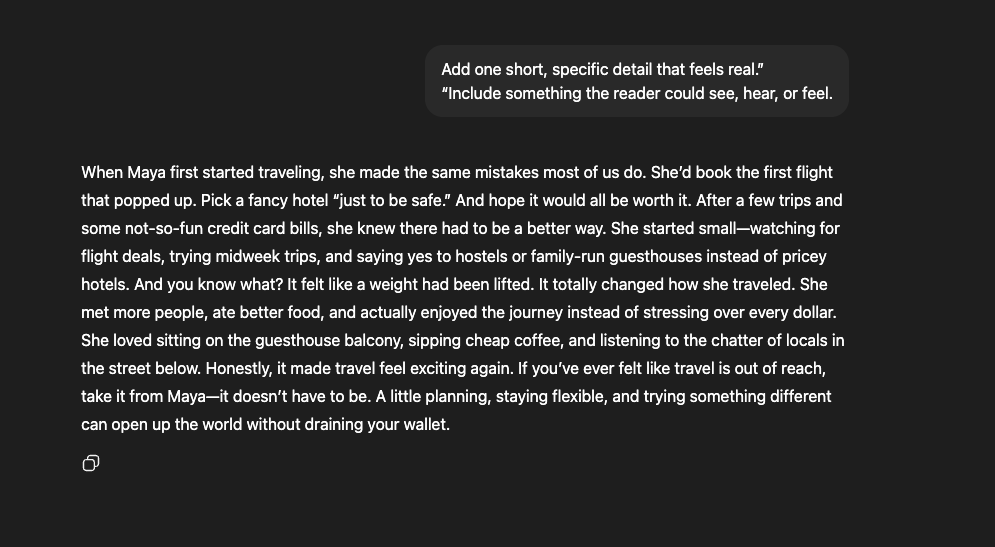
You don’t need to overload it. Just one or two small details make the writing sound like someone was actually there. It’s not about turning it into a literary masterpiece, it’s just the small things that make a huge difference.
Swap Perfect for Real
AI is great at sounding polished. That’s also the problem. Perfect writing feels safe, and safe writing rarely feels human.
People make small mistakes when they talk. They pause, backtrack, and use filler words. Those quirks make speech feel natural, but AI avoids them. It smooths everything out until it starts to sound like a manual.
Here’s the difference:
AI version
Maintaining focus while working remotely requires strong discipline and clear planning.
Human version
Working from home sounds easy until you realize the fridge is ten steps away. Staying focused takes effort, not just a to-do list.
See how the second one feels lighter and more real? It’s not flawless, but it sounds alive.
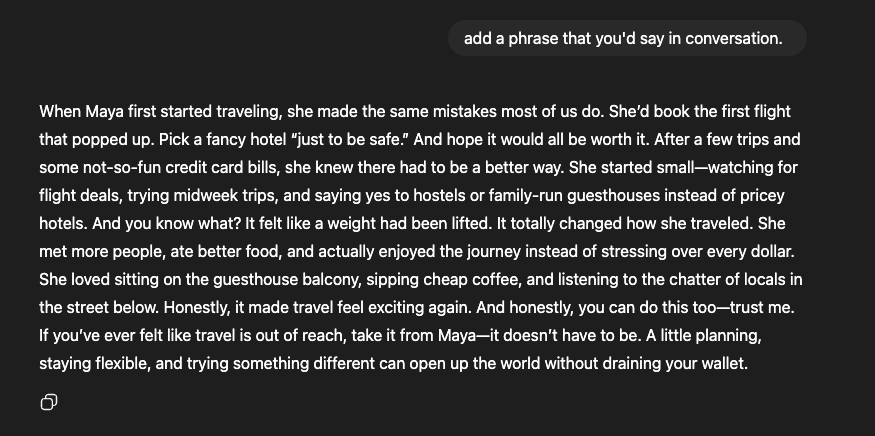
When you edit AI text, don’t aim for perfection. Let a few rough edges stay. Add one phrase that sounds like something you’d say in conversation like a “sort of,” “honestly,” or “you know what I mean.” A few of those soften the tone and make readers feel like they’re listening to a person, not software.
A 2023 study in Scientific Reports found that human writing often includes subtle uncertainty and emotion, while AI tends to sound overly confident and formal. In other words, it’s okay to sound unsure sometimes. That’s what people do.
So when the text feels too polished, loosen it up. Drop the corporate tone, trim the jargon, and let it sound like someone thinking out loud. Real beats perfect every time.
Tools That Help You Sound More Human
You don’t need fancy software to make AI writing sound natural, but a few free tools can make the process smoother. Think of them as helpers that catch what you miss: rhythm, tone, or flow. The goal isn’t to replace your voice. It’s to polish it.
Here are a few worth trying:
| Tool | Best For | How It Helps | Pro Tip |
|---|---|---|---|
| Grammarly (Free Plan) | Tone and clarity | Flags when your writing sounds too formal or stiff so you can sound more conversational. | Don’t accept every correction. Leave small imperfections so your writing feels natural. |
| QuillBot (Paraphraser Mode) | Variety and flow | Rewrites awkward phrases and repetitive lines in a more natural way. | Use it to test different wordings, not to replace your own style. |
| Hemingway Editor | Readability and rhythm | Highlights long or complex sentences that slow readers down. | Aim for balance — not every sentence has to be short. |
| ChatGPT (Free or Plus) | Editing and tone | Can revise its own writing when prompted to sound more natural or conversational. | Paste your text back in and say, “Make this sound like a person explaining it.” |
| NaturalReader (Text-to-Speech) | Sound and pacing | Reads your writing out loud so you can hear where it feels robotic or flat. | Listen for rhythm and flow, then tweak lines that sound off. |
These tools are easy to mix and match. Each one focuses on a different piece of the puzzle, tone, rhythm, or variety. Use them lightly. They’re there to support your writing, not define it.
A 2024 report from the Nielsen Norman Group found that readers respond best to writing that sounds clear, conversational, and confident. The same rule applies when editing AI text. The closer your words sound to real conversation, the more trustworthy they feel.
Final Thoughts
Humanizing AI content isn’t about hiding the fact that you used a tool. It’s about using that tool better. When you teach AI your rhythm, your tone, and your way of thinking, the results stop sounding robotic and start sounding like you.
After working with AI for months, one thing stands out: it’s not the model that makes writing good, it’s how you guide it. Every prompt, edit, and small detail adds up to a voice that feels real. That’s what readers connect with.
If you want to take this further, try using AI in a different way. Instead of writing, use it to build skills. The post ChatGPT Coding for Beginners: How to Use AI Without Knowing Code in 2025 shows how to learn practical problem-solving with AI, even if you’ve never touched code before. The more you experiment with AI across different tasks, the better you’ll get at making it sound and think more like you.
Keep practicing. Keep refining. The goal isn’t to sound perfect… it’s to sound human.

Common Questions About Humanizing AI Content
How can I make ChatGPT sound more human?
Start by being clear about tone. Instead of saying “make this sound better,” try “make this sound casual and natural, like a friend explaining it.” Give short, direct prompts and examples of the voice you want. The more specific you are, the closer the AI gets to sounding real.
Can AI improve tone automatically?
Not really. AI can follow tone cues, but it doesn’t know what “human” feels like unless you teach it. You’ll get better results if you ask for edits in steps. For example, first ask it to point out robotic phrases, then have it rewrite them. It’s a small change, but it makes a big difference.
What’s the best way to check if AI text sounds robotic?
Read it out loud. Your ear catches what your eyes miss. If a sentence sounds stiff or repeats the same rhythm, it’s probably too machine-like. You can also paste it into a free text-to-speech tool and listen. If it sounds like something you wouldn’t say out loud, fix it.
How do I humanize AI content for SEO?
Focus on clarity and trust, not keywords. Google’s systems look for writing that sounds natural, helpful, and written for people first. Add small opinions, real examples, and smooth transitions. Avoid filler phrases like “in today’s world” or “furthermore.” Real writing performs better than robotic text every time.
How can I keep my own voice when using AI?
Show it your style. Paste a few of your own sentences and say, “Write the rest like this.” Keep editing until it sounds right. Over time, AI will learn your rhythm. Think of it as a writing partner, not a replacement.